
How sharing works
Sharing a tour creates a public link that needs no login. There's no invitation to send and no account for the recipient to create — an adjuster or homeowner just opens the link and starts walking through the property.
Turning on sharing- Open the Share menu in the tour header.
- Switch the Sharing toggle to On. This saves immediately and creates the link.
- Click Copy link to put the address on your clipboard — you'll see Share link copied to clipboard.
- Click Open view link to open the public page in a new tab and see exactly what your recipient will see.
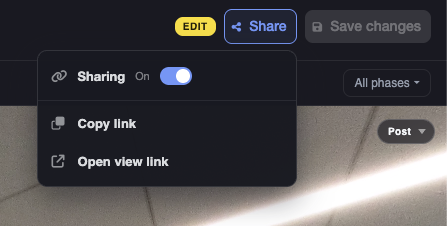
Copy link and Open view link stay disabled until you've switched sharing on. If they look greyed out, the toggle is what you're missing.
What your recipient sees
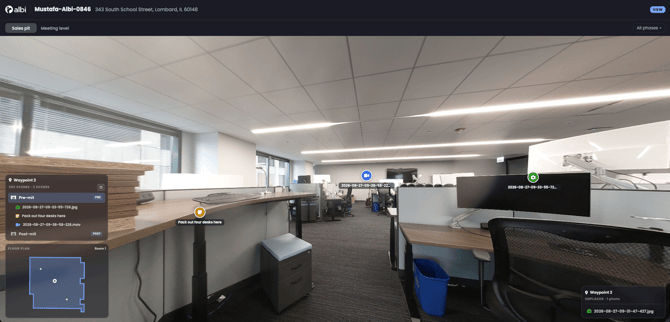
The same tour, read-only and Albi-branded, with the project name, address, and claim number in the header. They get the floor tabs, the phase filter, the mini-map, the scene panel, the note drawer, the photo and video lightbox, and Compare phases.
They can tap items to preview them, but they can't drag, rename, or save anything.
Turning sharing off and back on
Switching sharing off kills the link immediately. Switching it back on restores the same address — the link is reused, never regenerated.
That means if you shared a link, turned sharing off, and later turned it back on, you don't need to resend anything. The link your recipient already has will start working again.
What sharing can't do yet
These are the current limits when sharing a link:
- Share links don't expire and have no view limit. They stay live until you switch sharing off.
- The shared page can't show your own logo. The public viewer is Albi-branded.
- There's no PDF or printable export of a tour. It's delivered as a link only.
- A link can stop working without you touching anything if Interactive Tours is no longer part of your plan. If an adjuster reports a dead link and your sharing toggle is still on, contact us to check your account.
Next steps
- For what an Interactive Tour is and how to open one, see Interactive Tours: Overview and Getting Started.
- To get 360s and media into a project in the first place, see Capturing 360 Scenes and Media in the Field.
- To arrange them into a tour, see Building Your Tour: Media, Renaming, and Phases.
- If something isn't working, see Interactive Tours: Troubleshooting and FAQ.