
What is XactAnalysis?
XactAnalysis (XA) is the insurance industry's real-time assignment processing network. It connects insurance carriers, TPAs (Third Party Administrators), and restoration contractors.
-
Carriers and TPAs send job assignments to contractors through XA
-
Contractors receive assignments, update job status, and push data back to XA
-
Performance metrics (PALM scores) are tracked based on response times
How the Integration Works
When connected, Albi integrates with XactAnalysis to:
-
Import assignments — New jobs from XA appear in Albi's Leads table
-
Export status updates — Key dates sync back to XA automatically
-
Sync notes — Notes marked as "public" push to XA
-
Sync documents/images — Files marked as "public" push to XA
| XactAnalysis → Albi | Albi → XactAnalysis |
|
|
Setup Instructions
Step 1: Connect in Albi
-
Go to Settings → Integrations in Albi
-
Find XactAnalysis in the list and click Connect
-
Enter your XA credentials (Company ID and XactNet Address)
-
Click Save
-png.png?width=586&height=327&name=image%20(2)-png.png)
You can also configure a different Xactimate Net Address for each company location, allowing each location to use its own credentials.
Where to Find Your Credentials
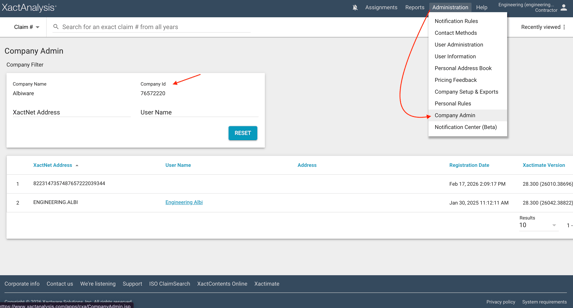
XA Company ID
Log into XactAnalysis → Administration → Company Admin
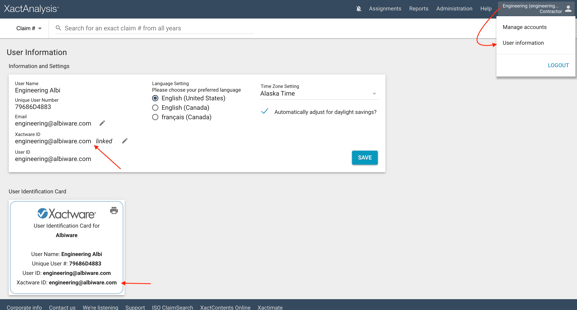
XactNet Address
Your Xactimate login email → User information → XactNet Address
Step 2: Configure XactAnalysis
After connecting in Albi, you must also configure XactAnalysis:
-
Log into XactAnalysis
-
Go to Company Setup and Exports
-
Find the "Albi Link" setting
-
Set it to "Automatic" (not "None")
⚠️ Important Note: The "Albi Link" setting defaults to "None" in XA. If this isn't changed to "Automatic", leads will not sync to Albi even though the integration appears connected.
Verifying Setup is Complete
The integration is working when:
-
A project from XA appears on your Leads page in Albi
-
You see the "Is Public" toggle when creating notes on XA-originated projects
Key Features
Assignment Import
When a carrier sends an assignment through XA, it appears in Albi's Leads table.
| What imports automatically: | What requires manual entry: |
|
|
💡 Tip: The assignment notification email that XA sends when a new job comes in contains all the customer data. Reference these emails to fill in the missing fields when converting a lead.
Date Sync
These dates in Albi sync back to XA automatically:
| Albi Field | XA Field |
| First Contacted | Customer Contacted |
| Inspection Date | Site Inspected |
| Estimate Sent | Estimate Received |
| Estimate Approved | Client Approved |
| File Closed |
File Closed |
| Job Started |
Work Start Date |
| Job Completed |
Work Completed |
Notes Sync
Notes can be pushed to XA when marked as public. When creating a note, you'll see an "Is Public" toggle:
-
Toggle ON: Note syncs to XactAnalysis
-
Toggle OFF: Note stays internal to Albi only
Note: Notes pushed to XA show as from "Exact Net System." Include your name in the note content so adjusters know who to respond to.
Documents & Images Sync
Similar to notes, documents and images can be marked as "public" to sync to XA.
What to Know
Customer Data Requires Manual Entry : Customer information (name, phone, email, address) does not automatically import from XA due to carrier data sharing requirements.
Use the assignment notification email as your data source when creating projects.
Dual Integration Creates Duplicate Assignments :If you have both XactAnalysis and Xactimate integrations connected, converting an XA lead to a project creates a second assignment in XA under "Albiware Staff Dataset."
Solution: Filter out the "Albiware Staff Dataset" in your XA assignment view, or use XA's merge feature to combine duplicates.
Notes Sync One Way : Notes sync from Albi to XA, but adjuster notes added in XA do not automatically appear in Albi. Check XA directly for adjuster responses.
Initial Setup Delay : After first connecting, there may be a delay of up to 2 hours before data starts syncing. This is normal.
Troubleshooting
Leads Not Appearing in Albi
-
Check XA integration is connected in Albi Settings
-
In XA, verify "Albi Link" is set to "Automatic" (not "None")
-
Verify the assignment status in XA is "Delivered" or "Approved"
-
Check if leads are going to a different Albi company/account
-
Wait up to 2 hours after initial setup for first sync
"Is Public" Toggle Not Showing
The XactAnalysis integration is not enabled for your account. Check Settings → Integrations.
Notes Not Syncing to XA
-
Verify the "Is Public" toggle was ON when creating the note
-
Check XA integration is connected
-
Notes may take a few minutes to sync
Can't Find Credentials
Go to XactAnalysis Company ID
XactNet Address: xactware.helpdocs.io
Frequently Asked Questions
Q: Why can't I see the customer's name on incoming leads?
Customer data requires carrier authorization. Currently, customer info must be entered manually. Reference your XA assignment notification email for this data.
Q: Why do my notes show as "Exact Net System" in XA?
This is how notes from Albi appear in XA. Include your name in the note content so adjusters know who to respond to.
Q: Why did converting a lead create another assignment?
If you have both XA and Xactimate integrations, this is expected behavior. Filter out the "Albiware Staff Dataset" in XA to avoid confusion.
Q: Which dates sync to XA?
First Contacted, Inspection Date, Estimate Sent, Estimate Approved, and File Closed all sync automatically.
Q: Where do I find my XA Company ID?
Log into XactAnalysis and go to Company Setup
Q: Where do I find my XactNet Address?
This is your Xactimate login email. See Xactware's help article if you're unsure.