
The Workbook is the central hub for managing all estimate-related, item-level, and order-related information within an Albi project. It is where financial details, job components, and operational documents come together to support accurate estimating, organized execution, and seamless billing.
The Workbook is divided into three main tabs—Estimates, Items, and Orders—each serving a specific role in building and managing the project from estimate creation through work orders and purchase orders.
-
Estimates: The Estimates tab is where project pricing and scope are created and approved. Estimates can be pulled in from Xactimate, uploaded from external files, or built directly in Albi. Once an estimate is signed or marked as signed, its line items become active and move into the Items tab.
-
Items: The Items tab contains all approved materials, labor, equipment, and time entries for the project. These items represent the actual components of work and are used to build work orders, purchase orders, and invoices. Items are typically generated from signed estimates but can be organized, grouped, and managed as the project progresses.
-
Orders: The Orders tab is where Workbook items are turned into execution documents. This includes Work Orders, which define the scope of work assigned to teams or vendors, and Purchase Orders, which define the materials or resources needed to complete that work. Orders ensure work is tracked, authorized, and properly documented.
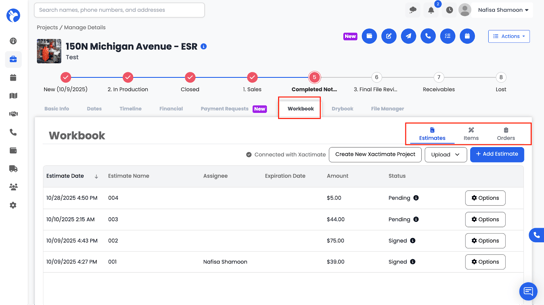
Each tab serves a different purpose in building, organizing, and managing the project’s financial and job-related documentation.