
Orders
The Orders tab includes Work Orders and Purchase Orders.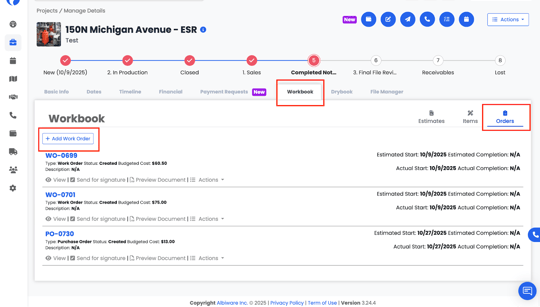
How to create a Work Order
-
Click Add Work Order.
-
A form will open where you complete required fields:
-
Date
-
Order Number
-
Assignee
-
Staff
-
Relationships
-
You can: Add an existing relationship by selecting a contact or organization already in your database, or Create a new Contact or Organization directly from the order if the relationship does not yet exist.
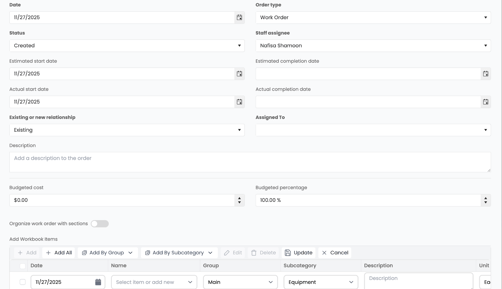
3. Add Workbook items to the Work Order.
When creating a Work Order in Albi, you can choose how Workbook items are added and organized to match your workflow.
You can add items to a Work Order in the following ways:
- Add by Group – Select specific groups from the Workbook to include only the items within those groups.
- Add All Items – Add every available item from the Workbook items list at once.
Using Sections in a Work Order
You can also create sections within the Work Order. Sections allow you to organize items by group, room, phase, or any structure that makes sense for your job (for example: Demo, Drying, Reconstruction, or by room).
This is especially useful when your Workbook items are already grouped, as it lets you mirror that organization directly in the Work Order for clearer documentation and easier review.
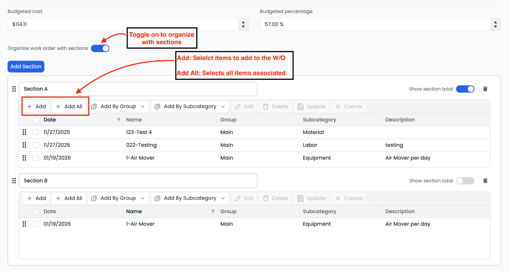
4. Budgeted Cost & Budgeted Percentage on Work Orders
When creating a Work Order in Albi, you have the option to use Budgeted Cost and Budgeted Percentage to control what pricing information is visible to vendors, subcontractors, or external recipients.
This feature is designed to protect your internal margins and ensure that vendors only see the amount you are budgeting for their work — not your total project revenue or profit.
What Budgeted Percentage Means
The Budgeted Percentage allows you to apply a markup or margin buffer across all items on a Work Order.
Example:
-
If you enter a 25% budgeted percentage, Albi will automatically calculate a budgeted cost for each line item based on that percentage.
-
The budgeted cost is what appears on the Work Order.
-
Your internal pricing, profit, and actual project revenue remain hidden.
How This Works on a Work Order
When a Work Order is created:
- Line items are adjusted using the budgeted percentage
- The Budgeted Cost is displayed instead of the internal cost or selling price
- Vendors only see the approved budgeted amount for their work
- Your profit margins and internal pricing are not visible
This ensures:
- Vendors are paid the correct amount
- Internal pricing stays confidential
- Work Orders can be shared externally without exposing margins
5. Add a note that will appear on the signature page (optional).