
How to Access the Leads Dashboard
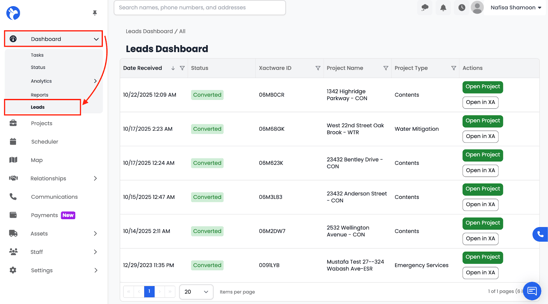
To view the Leads Dashboard:
- Open the left-side navigation menu in Albi.
- Go to Dashboard.
- If your company has XactAnalysis connected, you will see a new option labeled Leads.
- Click Leads to open the dashboard.
Note:
The Leads Dashboard only appears if your company has enabled the integration:
Settings → Integrations → XactAnalysis
What You Will See on the Leads Dashboard
When you open the Leads Dashboard, you will see a structured list of all incoming XactAnalysis related projects. Each row represents an assignment sent into Albi.
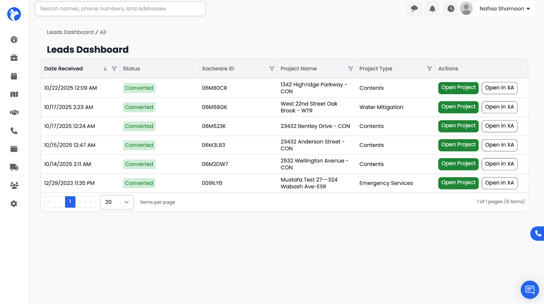
This table includes:
- Date Received – When the lead/assignment was pushed from XactAnalysis.
- Status – Example: Converted, Pending, Unprocessed.
- Xactware ID – The unique ID from XactAnalysis for tracking and reference.
- Project Name – The name or address associated with the assignment.
- Project Type – Example: Water Mitigation, Emergency Services, Contents, etc.
- Actions – Quick options such as:
- Open Project – Opens the linked project in Albi
-
- Open in XA – Opens the assignment directly in XactAnalysis
Actions: Open Project & Open in XA
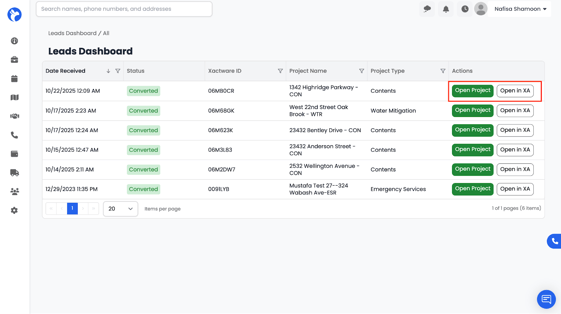
On the right side of each lead row, you will see two action buttons:
1. Open Project
When you click Open Project, Albi will immediately take you into the project associated with that XactAnalysis assignment.
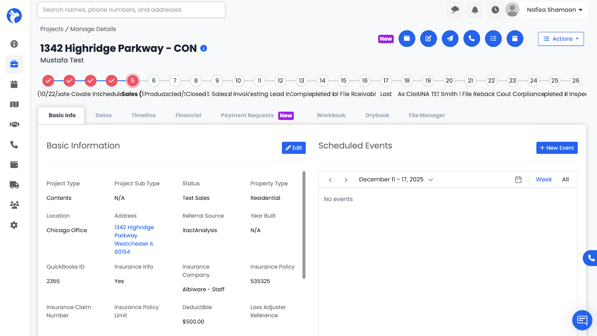
Inside the project, you can:
- View and edit project details
- Schedule events
- Manage finances
- Add notes, contacts, and communication logs
- Create payment requests, timelines, and more
This is the quickest way to begin working on the assignment inside Albi.
2. Open in XA
When you click Open in XA, Albi will open the assignment directly in XactAnalysis.
This allows you to:
- Review assignment details exactly as sent by the carrier
- View supporting documents or insurer communications
- Confirm the information coming from XactAnalysis
- Cross-check case data between XA and Albi
This is especially helpful if you need to reference the original XactAnalysis file while updating the Albi project.
Purpose of the Leads Dashboard
The Leads Dashboard is designed to:
- Provide a real-time reflection of all XactAnalysis assignments.
- Offer a centralized view of incoming insurance leads and carrier-driven projects.
- Allow your team to quickly convert leads into active projects.
- Ensure that nothing submitted from XactAnalysis is missed or overlooked.
It is essentially your XactAnalysis inbox, displayed inside Albi.
What You Can Do from the Leads Dashboard
- View all leads synced from XactAnalysis.
- Track the status of each assignment.
- Instantly open the connected project inside Albi.
- Jump directly into XactAnalysis using Open in XA for additional details.
- Sort or filter by date, status, project type, or Xactware ID using the filter icon.