
Groups
Groups are used to organize estimate and item line entries in a clear, structured way. They help break down work by area, phase, or category so estimates and project items are easier to review and manage.
You can use groups such as:
- Main groups
- Subgroups (for example: Kitchen, Chicago Apartment, Bathroom, Basement)
- Room-based groupings
- Phase-based groupings (Demo, Drying, Reconstruction, etc.)
How Groups Are Created
Groups are automatically imported from any estimates that are created or pulled into Albi (including Xactimate estimates and uploaded estimate files).
Groups can also be manually created directly within Albi if additional organization is needed using the Add Group option on the right-hand side.
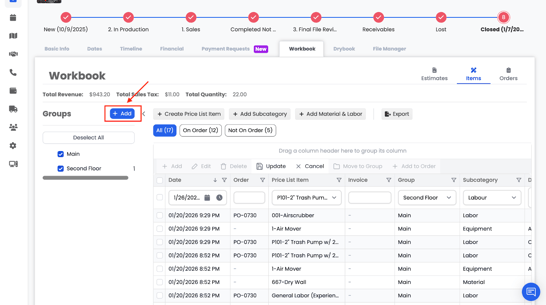
This flexibility allows your team to maintain the original structure of imported estimates while still adding or adjusting groups as the project evolves.
Groups help keep items organized and easy to navigate.
Note: Groups are automatically imported from any estimates that are created or imported into Albi. This includes estimates pulled in from Xactimate, uploaded PDFs or CSV files, and manually created estimates. Imported groups help preserve the original estimate structure and make it easier to review, organize, and invoice line items accurately.
Group Filtering
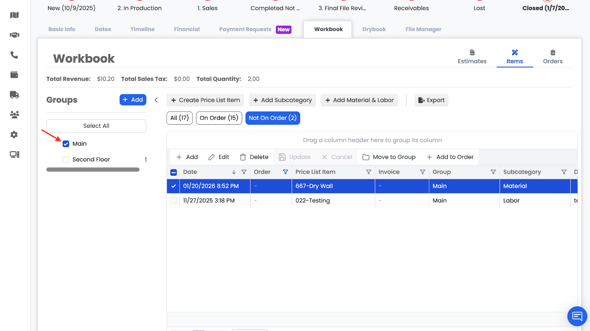
Groups also function as filters:
- If no groups are selected, items will not be shown
- Selecting a specific group (for example, Main) displays only items within that group
- Deselecting groups hides the items again