
Budgeted Cost & Budgeted Percentage on Work Orders
When creating a Work Order in Albi, you have the option to use Budgeted Cost and Budgeted Percentage to control what pricing information is visible to vendors, subcontractors, or external recipients.
This feature is designed to protect your internal margins and ensure that vendors only see the amount you are budgeting for their work — not your total project revenue or profit.
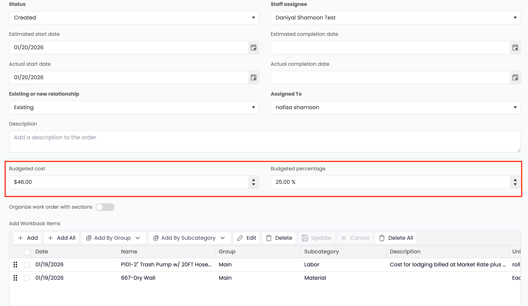
What Budgeted Percentage Means
The Budgeted Percentage allows you to apply a markup or margin buffer across all items on a Work Order.
Example:
-
If you enter a 25% budgeted percentage, Albi will automatically calculate a budgeted cost for each line item based on that percentage.
-
The budgeted cost is what appears on the Work Order.
-
Your internal pricing, profit, and actual project revenue remain hidden.
How This Works on a Work Order
When a Work Order is created:
- Line items are adjusted using the budgeted percentage
- The Budgeted Cost is displayed instead of the internal cost or selling price
- Vendors only see the approved budgeted amount for their work
- Your profit margins and internal pricing are not visible
This ensures:
- Vendors are paid the correct amount
- Internal pricing stays confidential
- Work Orders can be shared externally without exposing margins