
How to Access the Reports Dashboard
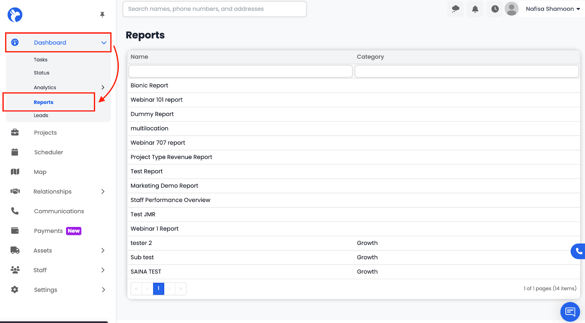
- Open the left sidebar navigation menu.
- Click Dashboard.
- Select Reports from the dropdown.
If you do not see the Reports tab, it means:
- Your company does not currently have the Albi Analytics Package,
or - Your user permissions have not been enabled to view analytics dashboards.
What the Reports Dashboard Is Used For
- View custom-built reports tailored to your workflows, metrics, financial visibility needs, or operational tracking.
- Access high-level summaries and deep-dive analytical reports that are not available in the standard system.
- Review insights such as:
- Revenue analysis
-
- Production performance
-
- Lead and referral performance
-
- Expense and profitability summaries
-
- Any other custom metrics your company requests
- Any other custom metrics your company requests
How Reports Are Created
All reports shown in this dashboard are:
- Designed and built by the Albiware team
- Created based on your company’s requested specifications
- Automatically added to your Reports Dashboard once completed
These reports cannot be edited or created by end-users directly; only the Albi team can generate or modify them.
How to Use the Reports Dashboard
Each report displayed will typically include:
- Charts, graphs, or tables created specifically for your operations
- Export options (Excel, PDF) depending on the report type
- Filtering options (if configured by the Albi team)
- Full-screen viewing for easier analysis
Reports update automatically based on your system data and provide an accurate snapshot of your business at any time.