
How to Access Your Profile
- Log in to Albi.
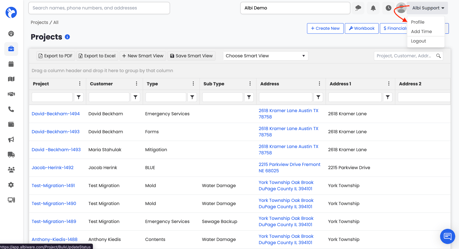
- In the top-right corner of the page, click the dropdown next to your name (for example, Albi Support).
- Select Profile from the menu.
This will open the Manage Profile page, where you'll see four tabs along the top: Information, Timesheet, Preference, and Email.
Tip: You can also click Add Time from this same dropdown to log time without leaving the page you're on.
Information Tab
This is the first tab you'll see when you open your profile. It holds all of your personal and account information.
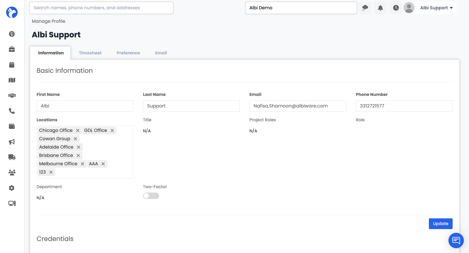
Basic Information
At the top of the tab, you'll see your basic details:
- First Name and Last Name
- Email - the address tied to your Albi login
- Phone Number
- Locations - the offices or branches you're assigned to
- Title, Project Roles, Role, and Department
- Two-Factor - toggle on for extra account security
After making any changes, click the blue Update button to save.
Credentials
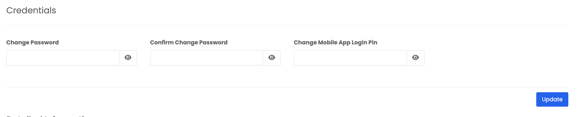
Below Basic Information, the Credentials section lets you update your sign-in details:
- Change Password and Confirm Change Password - update your Albi web password
- Change Mobile App Login Pin - update the PIN you use on the Albi mobile app
Click the eye icon to reveal what you've typed, then click Update to save.
Detailed Information
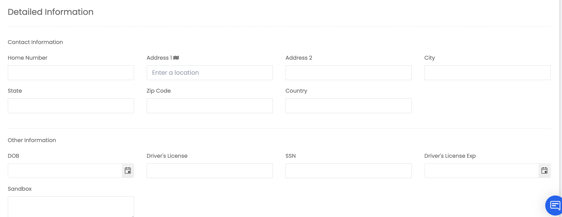
This section captures additional contact and personal details, including:
- Contact Information - home number and full mailing address (Address 1, Address 2, City, State, Zip, Country)
- Other Information - DOB, Driver's License, SSN, Driver's License Expiration, and a free-form Sandbox notes field
Emergency Information
- The name, phone numbers, and address for someone we should contact in case of an emergency
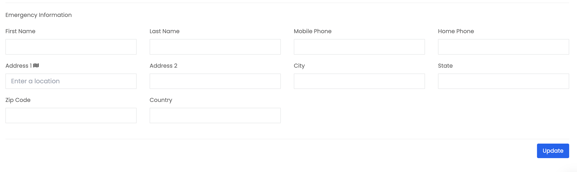
Click Update at the bottom of the section to save your changes.
Tip: Keeping your emergency contact and address details current helps your team reach the right person quickly when it matters.