
What is EagleView?
EagleView is an aerial measurement service used by roofing and restoration contractors to get detailed roof reports without physically climbing onto a property. Reports are generated from aerial imagery (satellite, drone, and aircraft photos) and typically include:
- Total roof square footage
- Pitch and slope
- Number of facets
- Lengths of ridges, hips, valleys, eaves, and rakes
- Diagrams and 3D views of the roof
Restoration and roofing teams use EagleView reports to estimate jobs faster and more accurately, especially on properties that are difficult or unsafe to measure by hand.
How EagleView integrates with Albi
The EagleView integration in Albi is designed to remove one repetitive step from your workflow: setting up the same project in two systems. Here is exactly what the integration does — and what it does not do — so you know what to expect.
What it does
- Creates a matching project shell in EagleView. When the integration is connected, Albi automatically creates a project in EagleView using the same project name that exists in Albi. That way, when you go to order a report, the project is already there waiting for you.
What it does NOT do
- It does not pull EagleView reports, measurements, or images back into Albi automatically.
- It does not auto-populate your Albi estimate with EagleView measurements (this is different from how the Xactimate integration works).
- It does not order reports for you. You still place report orders inside EagleView.
Think of the integration as a one-way handoff: Albi → EagleView. It saves you from re-typing the project name in EagleView. Everything else (ordering, downloading, attaching reports) is done the way you normally would.
Before you start
You will need:
- An active EagleView account with a current subscription. The integration uses your existing EagleView login — Albi does not include EagleView reports as part of your Albi subscription.
- Your EagleView username and password.
- Permission to manage integrations in Albi (typically an admin or owner role).
How to connect EagleView in Albi
Connecting only takes a minute. Follow these steps:
- Log in to Albi
- Click Settings in the left-hand menu.
- Open the Integrations tab.
- Find EagleView in the list of integrations. The status below to it will show Needs Setup.
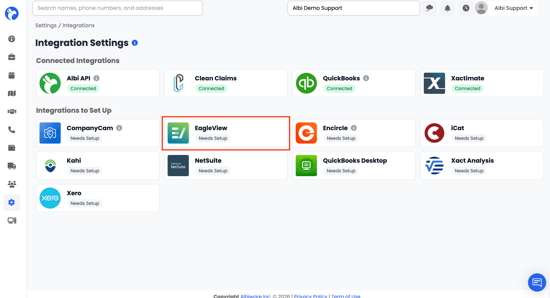
- Click Needs Setup
- Enter your EagleView username and password.
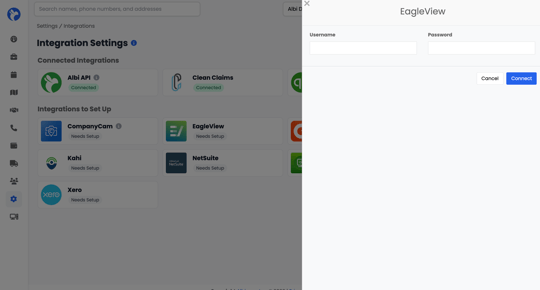
- Click Connect.
You should see the status update from Needs Setup to Connected. From this point on, any new project you create in Albi will also appear in your EagleView account by the same name.
Using the integration day-to-day
- Create your project in Albi as you normally would.
- Albi automatically creates a project with the same name in EagleView.
- Log in to EagleView and open that project.
- Order the report type you need (e.g. Premium Roof Report, QuickSquares, etc.) inside EagleView.
- When the report is delivered in EagleView, download the PDF or measurement file.