
What is Clean Claims?
Clean Claims is a third-party restoration documentation platform used by water mitigation and restoration companies. It is commonly used to capture and organize:
- Moisture readings and drying logs
- Equipment placement and removal
- Site, chamber, and room data
- Photos and supporting documentation for insurance carriers
If your team already uses Clean Claims for field documentation, the Albi integration removes the need to create the same project in two places.
How the Albi <> Clean Claims Integration Works
Once connected, Albi sends project information to Clean Claims based on the rules you choose. At a high level:
- Albi is the source of truth for project and customer details. Create and edit projects in Albi.
- When a project meets the sync rule you configure, Albi pushes that project to Clean Claims so your team can begin field documentation there.
- You can also sync a single project on demand by going to project > actions >integrations > sync
- If you change project info, dates, or status in Albi, those updates flow to Clean Claims while the integration is connected.
How to Connect Clean Claims to Albi
You only need to do this once per Albi account. You must be an admin (or have permission to manage Integration Settings).
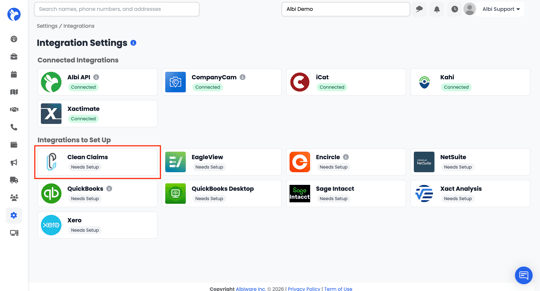
- In Albi, go to Settings → Integrations.
- Under Integrations to Set Up, find the Clean Claims tile and click Needs Setup.
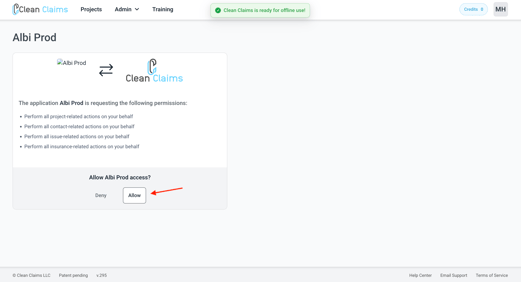
- You will be redirected to Clean Claims, which will show a message similar to: "The application is requesting the following permissions: perform all project, contact, issue, and insurance-related actions on your behalf."
- Sign in to Clean Claims if prompted, then click Allow.
- You will be redirected back to Albi. A confirmation banner will appear: "Clean Claims connected successfully."
- Clean Claims will now appear under Connected Integrations with a green Connected label.
Heads up: Don't see Clean Claims in your Integrations list? Your account may need the Clean Claims entitlement turned on. Reach out to Albi Support or your Account Manager and we can enable it for you.