
Expenses
The Expenses section tracks all job-related costs incurred during the project. These costs contribute to your project’s COGS (Cost of Goods Sold) and impact your overall gross margin. Accurately entering expenses ensures your financial reporting and profitability analysis remain correct.
Expenses may include:
- Materials purchased
- Subcontractor work
- Equipment rentals
- Disposal fees
- Supply purchases
- Labor costs not tracked through timesheets
- Any additional project-related charges
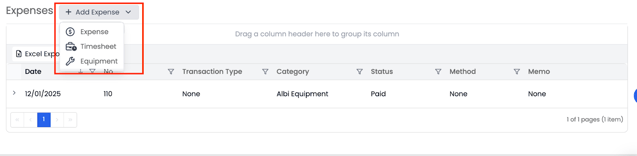
You can add expenses using three different methods: Expense, Timesheet, and Equipment.
Adding a Manual Expense
- Click Add Expense.
- Choose the Expense option.
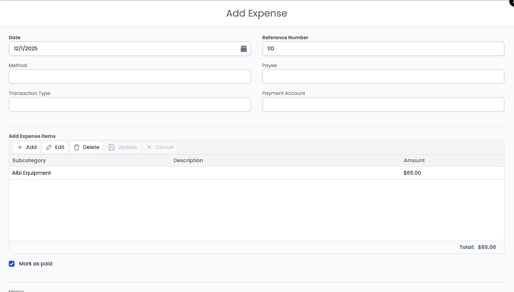
- A form will open where you can manually enter expense details, including:
- Expense date
-
- Vendor or payee
-
- Amount
-
- Reference number
- Expense category
- Memo (optional)
5. Check the Mark as Paid option if the expense has already been paid.
6. Required (bolded) fields must be completed before saving.
7. Click Save to record the expense.
Adding a Timesheet Expense
If staff have logged approved timesheet hours for the project, you can convert those hours into an expense.
- Click Add Expense.
- Choose the Timesheet option.
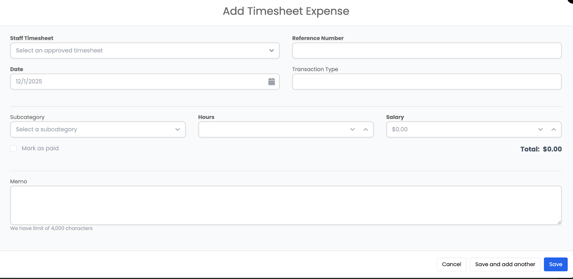
- Select the staff member’s approved timesheet entry from the dropdown.
- Enter:
- Reference number
-
- Hours
-
- Pay rate or salary amount
-
- Memo (optional)
-
- Date
5. Click Save or Save & Add Another to add multiple timesheet expenses.
This is especially useful when using labor costs for job costing or when timesheet data needs to be added to the project’s financials.
Adding an Equipment Expense
Equipment expenses represent the cost of equipment used for the project (if your company bills equipment internally or has cost-tracking requirements).
- Click Add Expense.
- Choose the Equipment option.
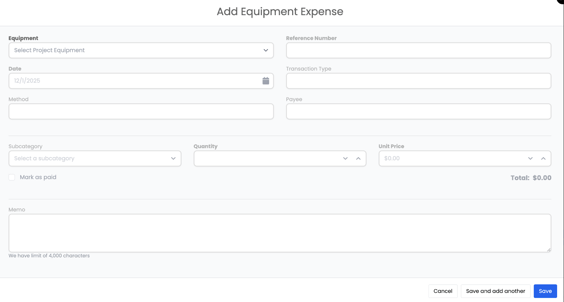
- Select:
- The equipment item
-
- Reference number
-
- Quantity
Unit price
- Quantity
5. Click Save or Save & Add Another.
This allows you to include equipment usage costs in the project’s COGS, even if the equipment belongs to your company.