
Where to Use Price Lists
To use a Price List on a project:
- Go to the Projects tab on your main dashboard.
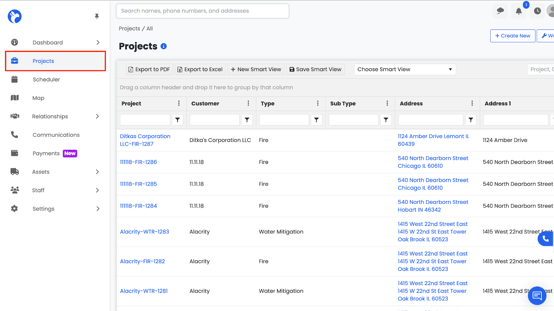
2. Select the project you want to apply the Price List to.
3. Within the project, navigate to the Workbook tab.
4. In the Workbook, go to the Estimates tab.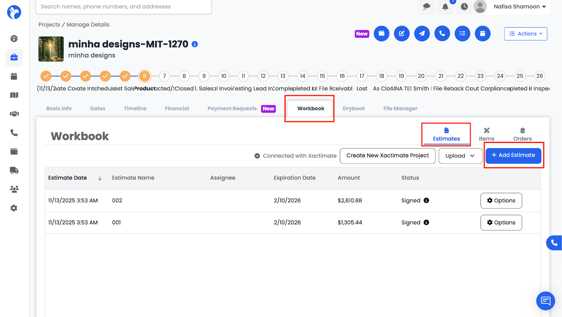
-
- The Estimate form will open, including sections for your Intro File, Closing File, and Line Items.
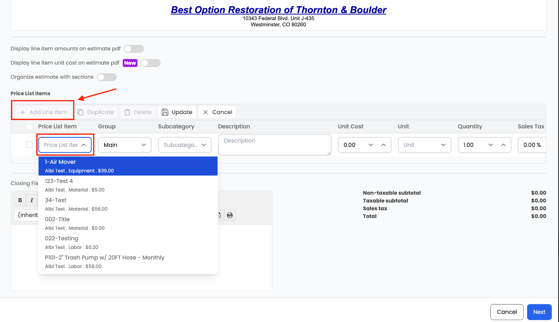
-
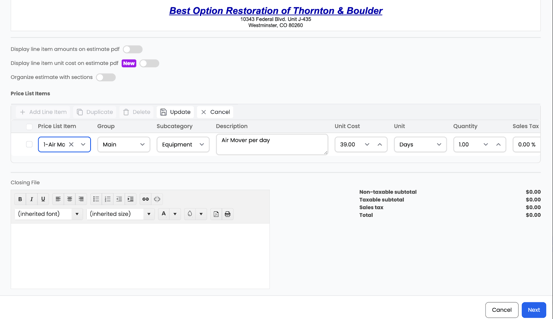
- Example: Choose Air Mover from the list.
- Enter the Quantity.
- Edit or confirm the Unit Price, Unit (e.g., day, each, square feet).
- Add a Description (e.g., “per day”) if needed.
- The estimate line will display Total with and without tax.
-
- Add to existing Workbook items, or
- Replace all existing Workbook items.
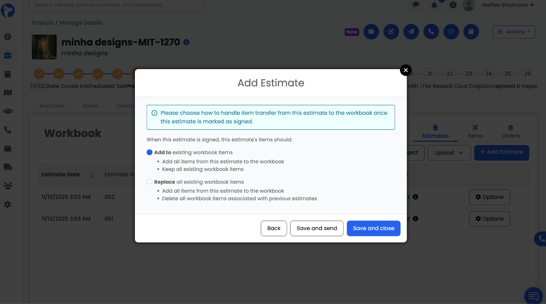
8. Choose your preference, then click Save & Close to save the estimate or click Save & Send to save and send the estimate for signature.