
Track Check Status
Go to the Payments module to view:
- Processing status
- Amount and fees (2% processing fee)
- Payee signature status (if applicable)
Statuses include:
- Submitted → Check has been sent
- Processing → Payment is being handled
- Pending → Waiting on other payees
- Succeeded → Payment completed
- Failed → Could not process
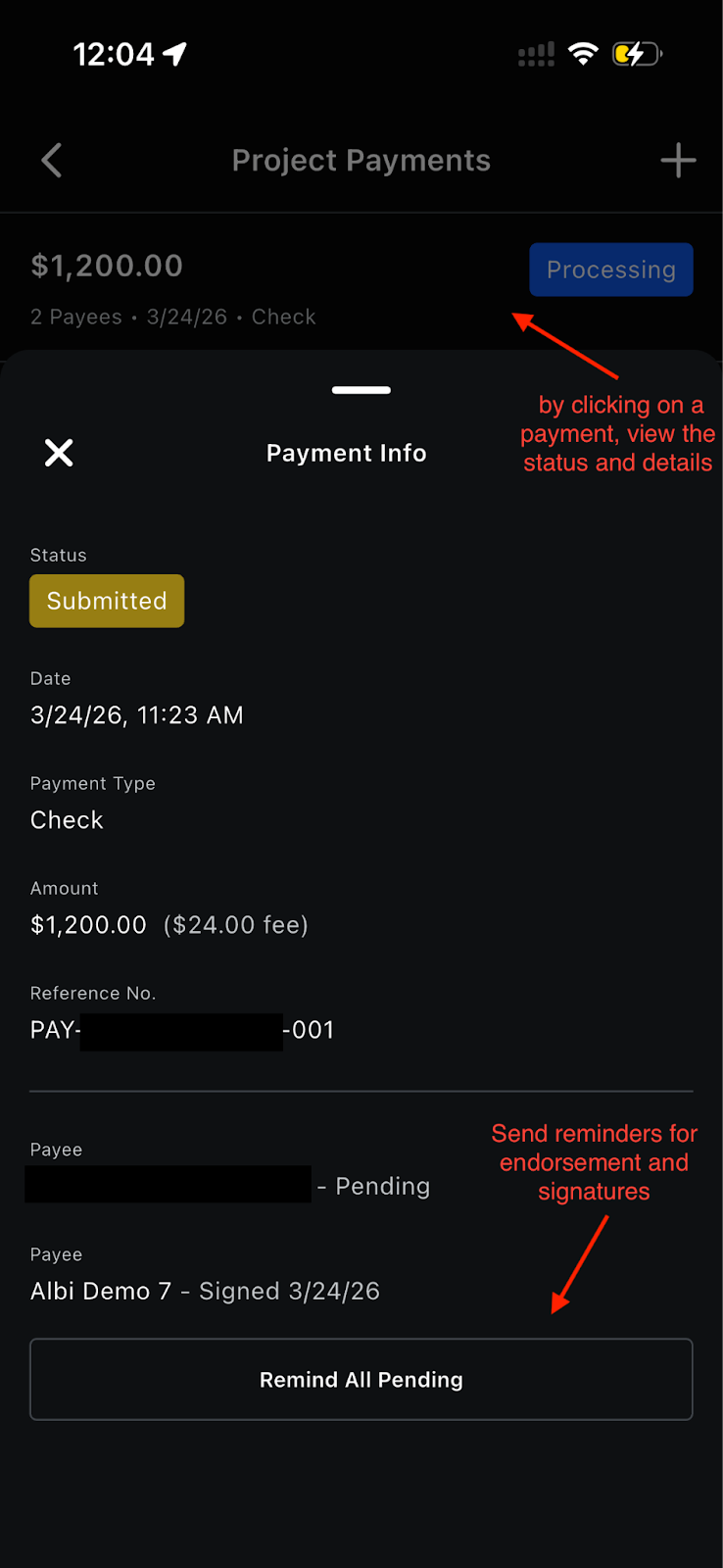
Payment Detail
Tapping a check payment opens a bottom sheet showing:
- Status badge, date, payment type, amount with fee deducted (e.g., "$150.00 ($3.00 fee)"), reference number, processing fee
- If payees exist: each payee's name and their status -- Pending, Expired, or Signed (with date, e.g., "Signed 10/25")
Actions (Requested Status Only)
For check payments in Requested status with payees:
- Remind All Pending -- sends a reminder to all payees who haven't signed yet. After sending, the button enters a 5-minute cooldown before it can be used again.
- Cancel Request -- shows a confirmation dialog ("Are you sure?"). Confirming cancels the signature request for all recipients and removes the payment from the list.
Troubleshooting
Camera Not Working
- Enable camera permissions in device settings
- Restart the app
Check Details Not Detected
- Improve lighting and focus
- Ensure the full check is visible
- Enter details manually if needed
No Internet Connection
Check processing requires internet access. Connect to Wi-Fi or cellular data and try again.
Check Failed
- Some checks may require additional verification
- You’ll receive an email with details if a check cannot be processed
FAQ
- Can I process a check without the internet?
Check scanning requires the internet for image validation via CheckSnap and for submitting the deposit. - Do I need to capture both the front and back of the check?
Both images are required for processing. - What if OCR gets the amount or check number wrong?
Both fields are editable on the confirmation screen. Tap the field to correct it manually. - Should the policyholder sign the back of the check before I scan it?
The back should be blank when scanned. If the check fails and needs reprocessing, a pre-signed check can't be retried digitally. - Do technicians need to verify their identity (Persona) to process checks?
Identity verification happens at the company level during onboarding. Individual technicians and project managers do not need to go through Persona. However, they must accept the terms confirmation for each deposit they initiate. - Why do I have to accept terms every time I deposit a check?
The per-transaction terms confirmation is a risk management requirement from Checkbook. It ensures the person initiating the deposit affirms the check details and payee information are accurate. This creates an audit trail and helps prevent misrepresentation. - What does "Requested" status mean?
Signature requests have been sent to payees but not everyone has signed yet. Use "Remind All Pending" to send a reminder. - Can I cancel a signature request after sending it?
Open the payment detail and tap "Cancel Request." This cancels for all recipients. - What's the processing fee?
2% of the check amount. - Q) What are the check limits?
$100,000 per check.