
Setting Up & Managing Phone Numbers
Phone numbers are managed from:
Settings → Communications
How to Add a New Number
- Go to Settings.
- Click Communications.
- Select Add Number.
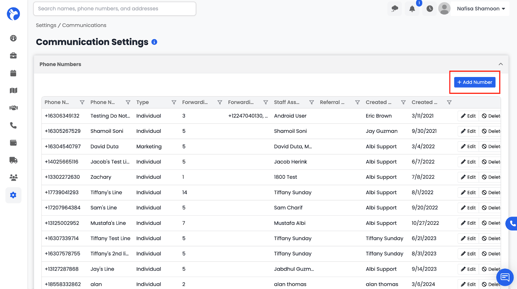
- A form will open where you can configure:
Number Configuration Options
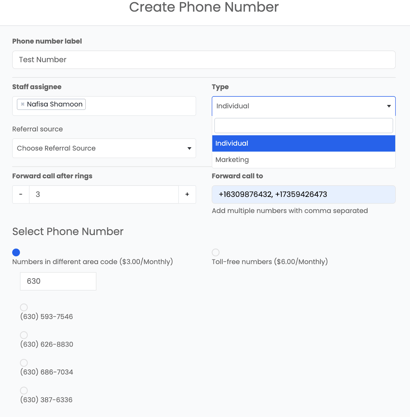
1. Phone Number Label
- Name for the number (ex: “John Smith”, “Sales Line”).
2. Number Type
- Individual Number – for direct communication (required for outbound calls).
- Marketing Number – for inbound marketing/campaigns.
3. Staff Routing
Choose:
- Who receives calls
- One or multiple staff members
- Ordering of call routing
4. Call Forwarding
- Choose how many rings before forwarding.
- Add multiple forwarding numbers.
5. Area Code Selection
You can choose:
- Local area codes (ex: 630 for Chicago)
- Toll-free numbers
- Each number costs $3/month
Albi generates a list of available numbers based on the selected area code. Choose one and it will be assigned to your company.