Merge Organization
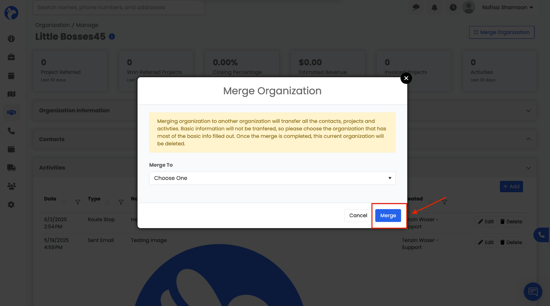
The Merge Organizations feature lets you combine two organizations into one. This is helpful if you accidentally created duplicates or if two records need to be joined together.
When you merge:
- All contacts, projects, and activities from the current organization will be moved into the organization you choose to merge into.
- Basic information (like name, address, email, etc.) will not be transferred. Because of this, always merge into the organization with the most complete basic information filled out.
- Once the merge is done, the organization you merged will be deleted.
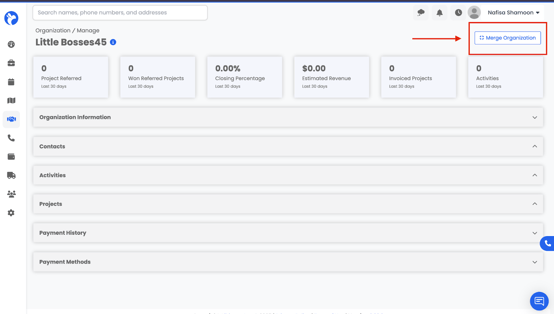
You can find the Merge option in the top-right corner when viewing any organization.
Example: If you have two records for the same company, one with all the contact details filled out and one with recent project notes, you should merge the second into the first. That way, you keep the complete contact info and also add the projects and activities.
How to Merge Organizations
- Go to Relationships → Organizations.
- Open the organization record you want to merge.
- In the top-right corner, click Merge Organization.
- Search for and select the organization you want to merge into.
- Double-check which record has the most complete details before confirming.
- Click Merge to finalize.