
Manage an Estimate
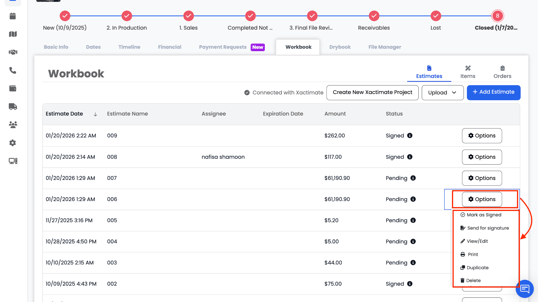
Once an estimate is created, you can:
1. Mark as Signed: When an estimate is marked as signed, Albi considers it approved and finalized.
📝 Important Note:
Line items from an estimate will not pull into the project’s Items list until the estimate is signed or marked as signed. Once signed, the estimate items become active and available for use in downstream documents such as work orders, purchase orders, and invoices.
- Send for Signature : From the estimate list, click Options next to the estimate and select Send for Signature. This opens the estimate signature workflow.
When sending an estimate for signature, you can
-
- Enter the email address of the person who needs to sign the estimate.
- If more than one approval is required, you can add multiple signers, and each signer will receive their own request to review and sign the estimate.
- Set an expiration date for the signature request (required)
- Add a custom message to include with the request (optional)
Note: Once sent, Albi will email the signer(s) a secure link to review and sign the estimate. The estimate will remain pending until all required signatures are completed or the request expires.
2. View/ Edit Permissions for Estimates
-
- Estimates in Albi remain fully editable until they are signed or marked as signed. While the estimate is in a draft or pending state, you can view, update, and make changes as needed.
- Once an estimate is signed or marked as signed, it becomes locked and can no longer be edited. This ensures the approved scope, pricing, and terms remain unchanged for record-keeping, compliance, and billing accuracy.
3. Print
4. Duplicate
5. Delete:
-
- When an estimate is deleted, all associated line items will also be removed unless those line items are already linked to a Work Order (WO), Purchase Order (PO), or Invoice.
- If a line item is associated with a WO, PO, or Invoice, it will be preserved to maintain financial and operational records, even if the estimate itself is deleted.