
How Drag and Drop Works
-
Click and hold a project card
-
Drag it into a different status column
-
Drop the card to update the project’s status
If the status is allowed for that project, the card will successfully move and the project’s status will update.
⚠️ Unable to Move a Project Card Between Status Columns?
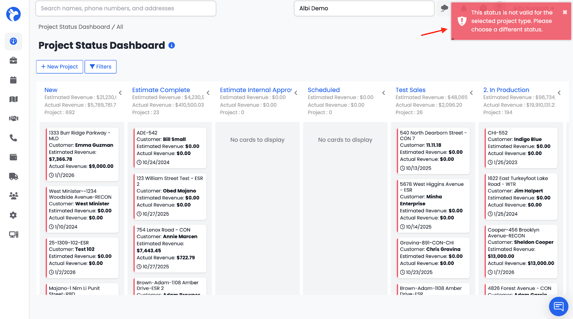
If you see an error when trying to move a project card to a different status column, it usually means that the project’s type does not have that status assigned to it.
Each Project Type in Albi has its own set of allowed statuses. If a status is not enabled for that project type, the project cannot be moved into that column on the Status Dashboard.
How to Fix It
-
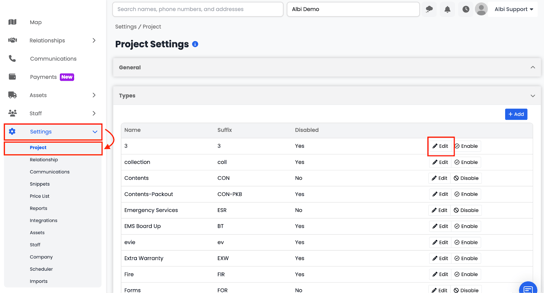
Go to Settings → Project Settings
-
Select Types
-
Open the specific Project Type used by the project by clicking Edit
-
Navigate to the Statuses section
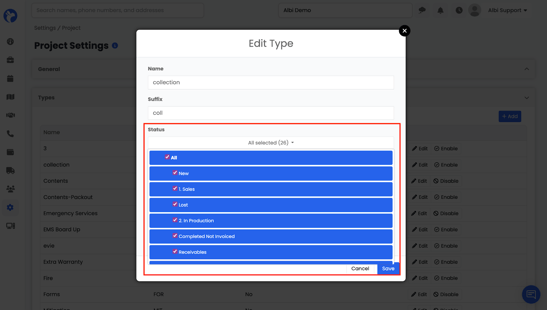
5. Make sure the desired status is selected/enabled
6. Save your changes
Once the status is added to the project type, you’ll be able to move the project card between status columns without errors.
📝 Note: Status availability is controlled at the Project Type level, not per individual project.