
Scheduler Filters
The Scheduler includes powerful filtering options that help you quickly narrow down schedules and focus on exactly what you need to see.
Where to Find Filters
- Open the Scheduler
- On the right-hand side, click Filters
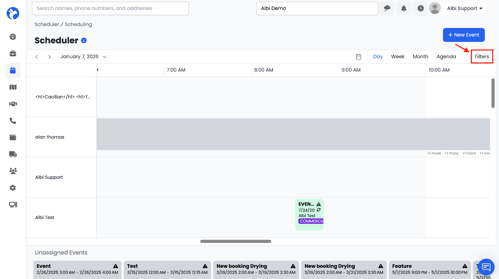
Clicking this button opens the Filters panel, where you can apply multiple filters at the same time.
Available Filter Options
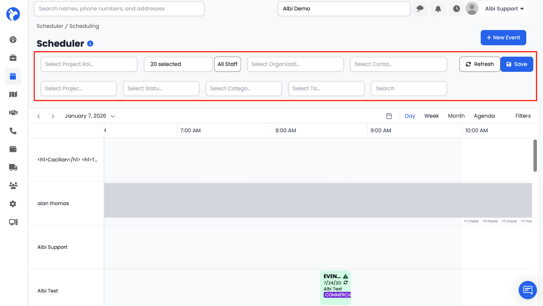
Project Roles
- Filter schedules by project role
- Useful for viewing only specific role assignments (e.g., inspector, technician, project manager)
Staff Members
- Select one or more staff members
- View only the schedules assigned to the selected users
Organization
- Filter schedules by organization
- Helpful when viewing work associated with a specific company or partner
Contact
- Filter by a specific contact
- Displays only schedules linked to that contact
Project Name
- Search by project name
- Ideal for quickly locating a specific job on the scheduler
Status
Filter schedules by appointment or job status, including:
- Confirmed
- Unconfirmed
- In Progress
- On Hold
- Complete
Categories
- Filter by categories created in Scheduler Settings
- Categories help group and organize scheduled items
Tags
- Filter schedules using tags
- Useful for custom workflows or internal tracking
Search
- Use the search field to find:
- Specific projects, Contact names, Organization names, Other searchable identifiers
View Options
In addition to filters, you can change how schedules are displayed:
- Specific Dates, Day, Week, Month, Agenda
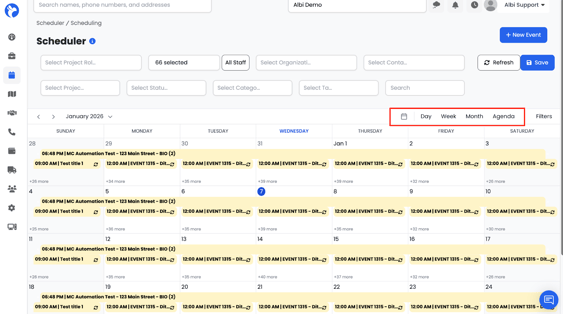
These view options help you visualize schedules at different levels of detail.
You can apply multiple filters at the same time to narrow results even further. The scheduler updates in real time as filters are applied.