
Create Activity
The Create Activity function lets you record important notes, reminders, or communications for any organization. Activities ensure everything connected to an organization is tracked in one place.
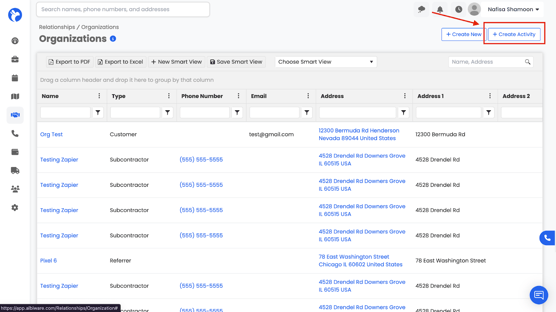
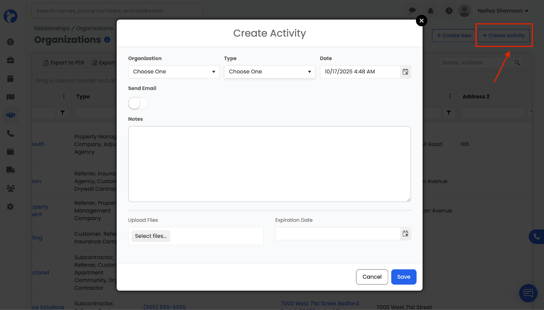
How it works:
- Organization & Type: Select which organization the activity belongs to and what type of activity it is (e.g., meeting, call, note).
- Date: Choose when the activity took place or when it’s scheduled.
- Notes: Add details about the activity (e.g., a summary of a meeting, next steps, or follow-up items).
- Upload Files / Expiration Date: Attach any relevant files and set an expiration if needed.
- Send Email (Optional): Toggle this on if you want your activity note to also be sent as an email.When this option is enabled, the note you write in the activity form can be sent directly to the selected contacts, and a record of that email will also be stored in the activity log.
📌 Good to know: Any activities performed by sales team members that are tied to a specific organization or contact will also appear in the Sales Team Productivity Overview under Sales Analytics (Dashboard → Analytics → Sales).
This helps managers track team performance and communication history in one place.
Using the Send Email Toggle
When you switch on the Send Email toggle, additional options appear:
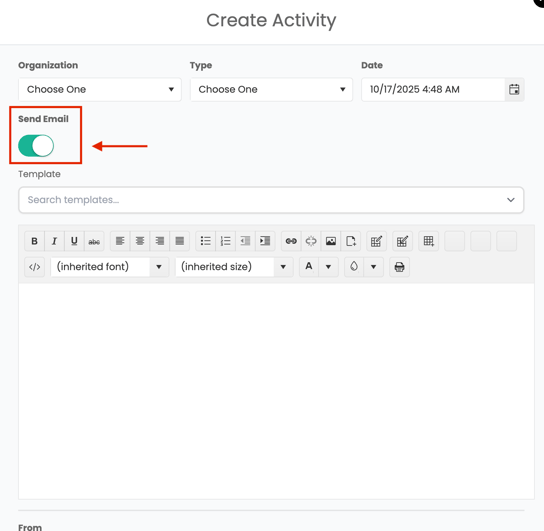
- Templates: You can pick a pre-made template to save time and keep communication consistent.
- Email Editor: A built-in text editor allows you to format the email (bold, bullet points, images, links, etc.), just like a normal email tool.
- Recipients: The “To” drop-down will include:
- All Albi staff emails (always shown).
- Any contacts linked to the organization that have a valid email address saved in their contact information.
📌If contact associated with the organization does not have an email address associated with their contact information, the contact will not show up in the email list drop down.
- From Field: Shows who the email will be sent from, ensuring clear communication.
This means you can write an activity note and instantly share it via email without leaving Albi. Both the note and the email record will then show up in the Activities section of the organization.