
How to Create New Organization
The Create New/ Create Organization function lets you add a new company, client, or partner into the Albi system. This is where all the important information about that organization is stored, to easily track relationships, jobs, and communication linked to them.
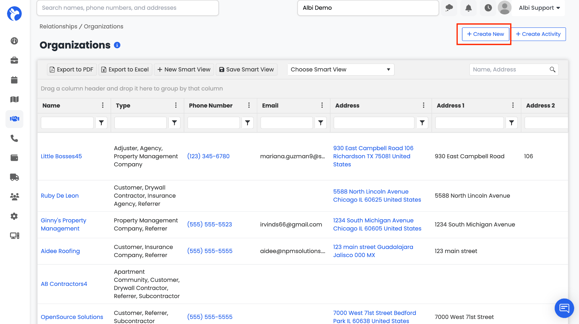
- Go to Relationships → Organizations.
- Click on Create New - A form will appear (like the one in the image below).
- Fill out the required fields (shown in bold) to create the record.
- Name – The organization’s name (required).
- Type – Select what kind of organization it is (e.g., Property Management Company, Customer, Insurance, etc.) (required).
- Email – A valid contact email (required).
4. All other fields such as Phone Number, Address, Referral Source, Financial CRM ID, Parent Organization, etc. are optional, but it’s a good practice to fill them in if you have the information.
5. Once done, click Save to store the organization in the system. 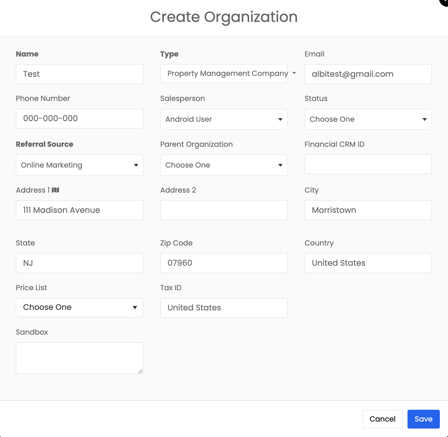
📌If contact associated with the organization does not have an email address associated with their contact information, the contact will not show up in the email list drop down.
- From Field: Shows who the email will be sent from, ensuring clear communication.
This means you can write an activity note and instantly share it via email without leaving Albi. Both the note and the email record will then show up in the Activities section of the organization.