
Moisture Points
The Moisture Points section is where you log specific moisture readings at defined locations.
A Moisture Point represents a single monitored location, like:
- East wall of living room (drywall)
- Carpet near sliding door
- Basement stair landing
- Ceiling under bathroom
3.1 Adding a Moisture Point
- Go to the Moisture Points tab.
- Click Add Moisture Point
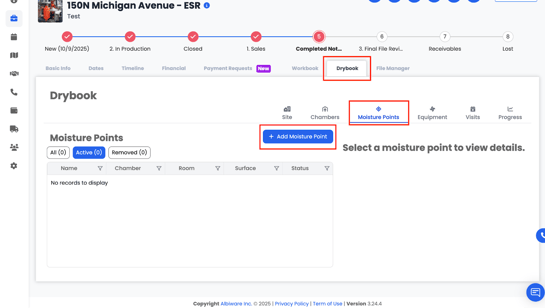
- A form will open where you can enter details such as:
- Chamber
- Room
- Surface / Material (e.g., drywall, carpet, subfloor, baseboard)
- Chamber
-
- Location Description (e.g., “North wall behind TV”)
-
- Starting Moisture Reading
- Drying Goal (target reading or percentage)
- Starting Moisture Reading
-
- Material Type (used for drying standard reference if available)
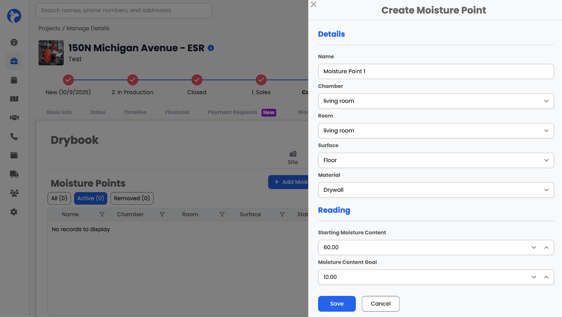
You can also add notes for each moisture point if you want to note something special about it.
Click Save to add the moisture point.
3.2 Viewing & Managing Moisture Points
Once moisture points are added:
- Each point will appear in a list or grid with its associated chamber, room, material, and readings.
- As you add Visits, those moisture points will get updated with readings per visit.
3.3 Removing a Moisture Point
When a Moisture Point has reached its drying goal and no longer needs to be tracked:
- Click Remove on that Moisture Point.
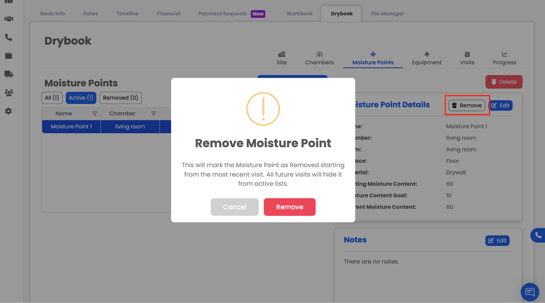
This will:
- Mark the moisture point as removed starting from the most recent visit.
- Hide it from active tracking on future visits.
- Keep it in the historical record so it still shows in reports and past visit logs.
📝 Note:
Moisture points added during later visits will also appear on prior visits. This is intentional—those moisture points were assumed to exist previously but may not have been discovered until materials were removed or further inspection was completed. Users are not required to enter moisture readings for these points on visits that occurred before the moisture point was added.