
How to Add a Phone Number
- Go to Settings → Phone Numbers
- On the right-hand side of the Phone Numbers tab, click the + Add Number button in the top right corner
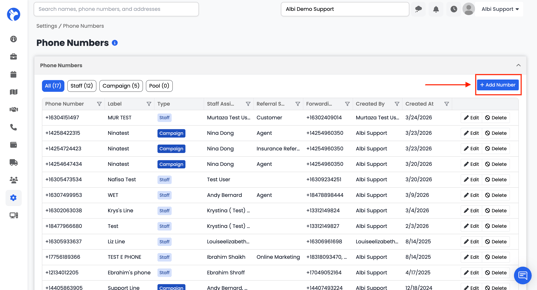
3. Choose How the Number Will Be Used
|
Option |
What It Does / When to Use It |
|---|---|
|
Campaign (Incoming calls) |
Rings multiple staff at once. Lets you assign a marketing source to track where leads come from. Best for marketing channels, ad campaigns, billboards, or website tracking. |
|
Staff (Make & receive calls) |
A dedicated line for one staff member to call out and receive calls. Best for personal lines for agents, reps, or managers. |
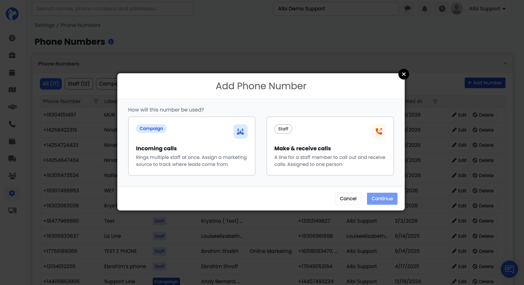
Click the option you want, then click Continue.
Creating a Staff Number
-
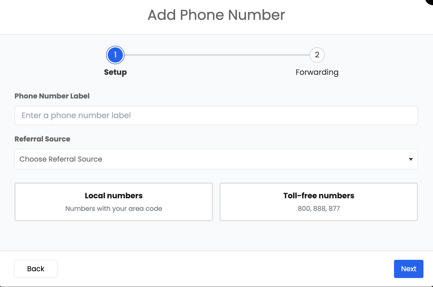
- Label – Enter a name for the phone label (e.g., “Admin's Line”, “Sarah's Support Line”).
- Referral Source – Choose a referral source (Optional)
-
- Number Type – Select either a local number (enter the Area Code you want) or a toll-free number (800, 888, or 877 numbers). Choose from the available generated numbers presented.
- Staff Assignee - Pick the staff member this number belongs to. (This person will make and receive calls from the number.)
- Forward calls to - Enter the phone number(s) that should ring if the staff member doesn’t answer in Albi. Separate multiple numbers with commas (e.g., +16309876432, +17359426473).
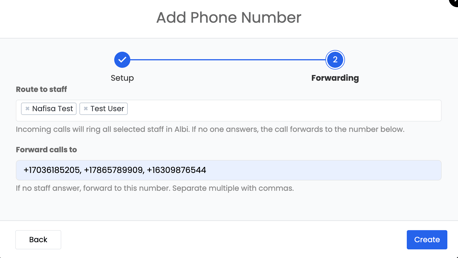
4. After filling out the form, click create to save the phone number.
Creating a Campaign Number
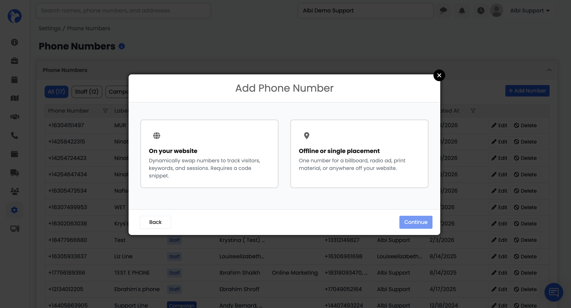
When you choose Campaign, you’ll be asked where the number will be placed
|
Option |
What It Does |
|---|---|
|
On your website |
Dynamically swaps numbers based on visitor, keyword, or session. Requires a small code snippet on your site. |
|
Offline or single placement |
One fixed number for a billboard, radio ad, print material, or anywhere off your website. |
Click the option that matches and click Continue.
On Your Website
Dynamically swap numbers to track visitors, keywords, and sessions. Requires a code snippet. This flow creates a pool of tracking numbers that swap on your site.
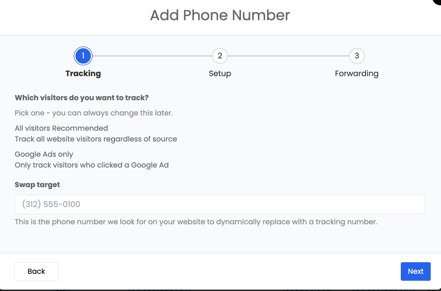
Tracking
-
Tracking Type – Choose who you want to track:
- All Visitors (Recommended) – Tracks everyone on your site
- Google Ads Only – Tracks only visitors from Google Ads
Swap Target – Enter the phone number currently on your website (e.g., (312) 555-0100). This number will be replaced with tracking numbers.
Setup
-
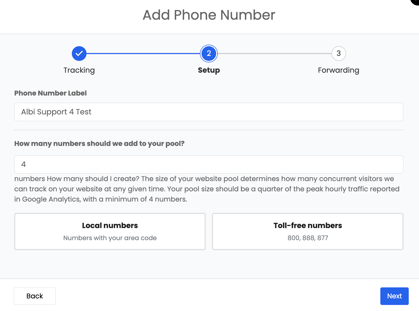
Phone Label – Enter a name for this number pool (e.g., “Support Line Test”).
-
Pool Size – Enter how many tracking numbers you need (minimum 4).
Tip: Use about 25% of your peak hourly traffic from Google Analytics.
-
Number Type – Choose Local or Toll-Free numbers.
Forwarding
-
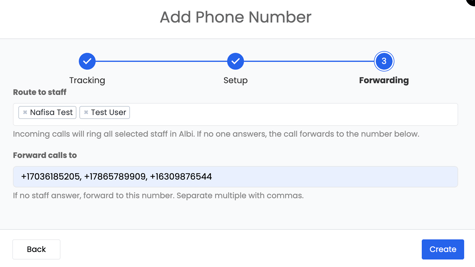
Route to staff — Select one or more staff members who should ring when the number is called. Incoming calls will ring all selected staff in Albi.
-
Forward calls to — Enter the backup number(s) to forward to if no staff answer. Separate multiple with commas (e.g., +16309876432, +17359426473).
-
Click Create.
Offline or Single Placement
- Label – Enter a name for the phone label (e.g., “OnlineMarketing Line”, “Google Ads Line”).
- Referral Source – Choose a referral source (Optional)
- Number Type – Select either a local number (enter the Area Code you want) or a toll-free number (800, 888, or 877 numbers). Choose from the available generated numbers presented.
- Staff Assignee - Pick the staff member this number belongs to. (This person will make and receive calls from the number.)
- Forward calls to - Enter the phone number(s) that should ring if the staff member doesn’t answer in Albi. Separate multiple numbers with commas (e.g., +16309876432, +17359426473).
Tips
- Labels matter — Use clear, descriptive labels so you can find the number later (e.g., “Google Ads - Roofing Campaign” instead of “Test 4”).
- Referral Source drives reporting — Always set one on Campaign numbers so leads are attributed correctly.
- Pool size for website tracking — If in doubt, start with 4 and scale up as traffic grows.
- Forwarding numbers are the safety net — Always include at least one so you don’t miss calls when Albi is closed or offline.