
Payments Overview
The Payments module in Albiware allows you to track all credit card (CC) and ACH transactions, monitor deposit activity, and review the overall financial performance of your payment processing. This section gives you a complete financial trail of every payment connected to your jobs.
How to Access the Payments Dashboard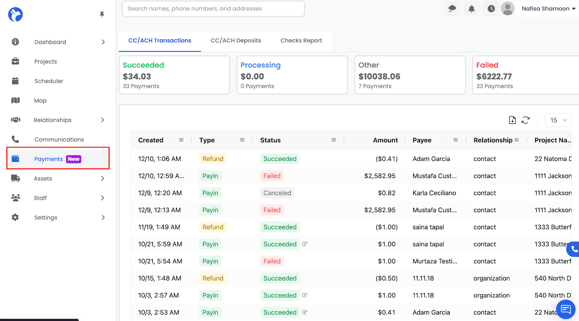
- Go to the left-side navigation menu.
- Click Payments (marked as NEW).
- This will open the Payments Dashboard, where all payment activity is displayed.
CC / ACH Transactions
The first tab you see is CC / ACH Transactions, which contains every payment processed through Albi.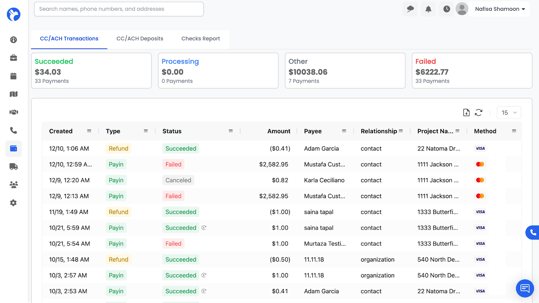
Each transaction row includes:
- Date Created
- Type (example: Payment, Refund, Charge Attempt, etc.)
- Status
- Succeeded
- Failed
- Canceled
- Processing
- Succeeded
- Amount
- Payee Name
- Relationship (Customer / Organization / Contact)
- Project Name (if the payment is linked to a project)
- Method (example: Visa, Mastercard, ACH, etc.)
You can click any column header to filter or sort the transactions.
Transaction Tools & Actions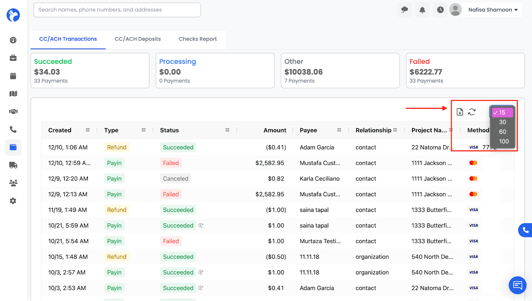
At the top-right of the transactions table, you will see:
Export
Click the export icon (file button) to download the transaction list.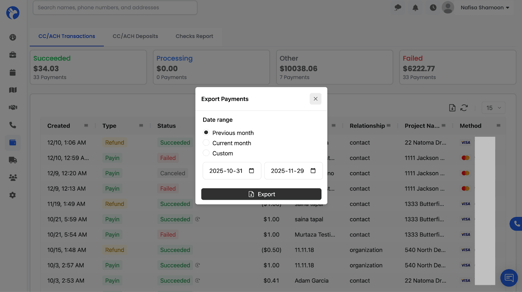
Refresh: Click the refresh icon to update the page with the latest payments.
Items Per Page: Choose how many transactions you want to display (15, 30, 50, etc.).
Payment Summary Metrics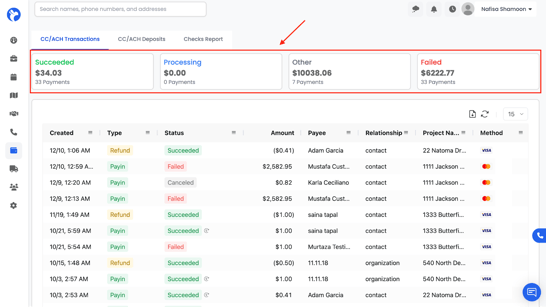
At the top of the page, you will see a set of financial summary cards showing:
- Succeeded Amount – The total value of all successfully processed payments.
- Processing – Payments that are still pending.
- Other – Any transactions that fall into miscellaneous categories.
- Failed Amount – Payments that did not go through.
- Total Payments Count – Example: “33 Payments.”
These totals update automatically based on your filters.
CC / ACH Deposits
The Deposits tab shows the deposits sent to your bank from credit card and ACH transactions.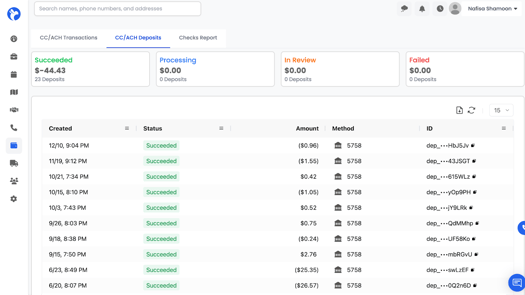
You will see:
- Deposit Date
- Amount
- Status (Succeeded / Pending / Failed)
- Related Transactions
- Deposit Identifier
This helps you match Albi payments with your bank deposits for accurate accounting and reconciliation. A single bank deposit may include multiple customer payments. By clicking on a deposit, you can open its details to view exactly which customer payments are included, making it easy to verify totals and trace each payment back to its source.
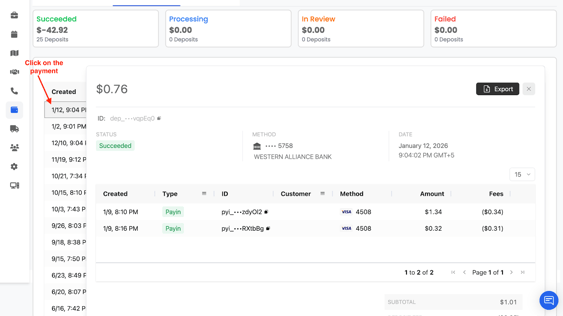
You can also filter deposit records by date, amount, or status.