
Chambers
Chambers represent zones or contained areas within the structure. A chamber could be a single room or a combined space (e.g., “Living Room / Dining Room”).
Examples of chambers:
- Living Room
- Kitchen
- Basement
- Master Bedroom
- Hallway
- Office
2.1 Creating a Chamber
- Go to the Chambers section in DryBook.
- Click Create Chamber.
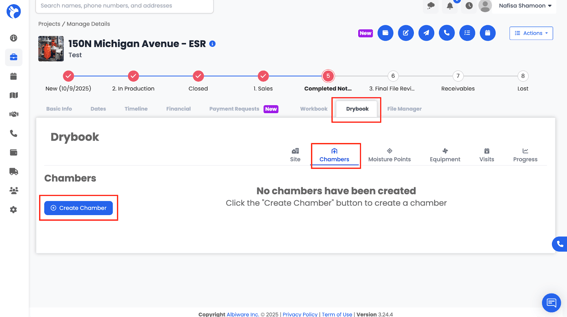
- A form will open for you to enter:
- Chamber Name (e.g., “Living Room”)
-
- Class of water loss (Class 1–4, if you track this)
- Temperature
4. Any other available chamber-level details
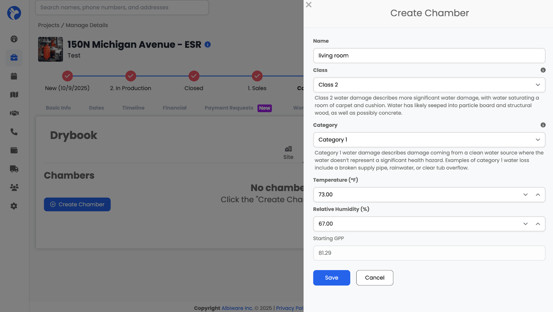
5. Click Save to create the chamber.
You can create multiple chambers to represent all affected areas.
2.2 Rooms Inside Chambers
Inside each chamber, you can define one or more Rooms.
Click Create Room within a chamber 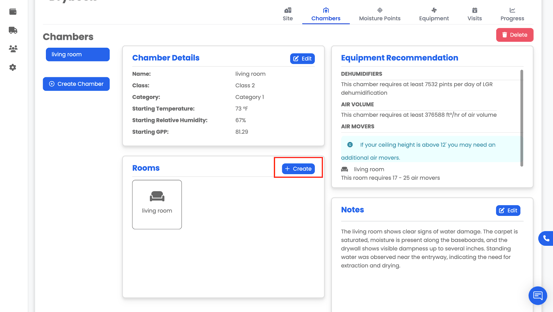
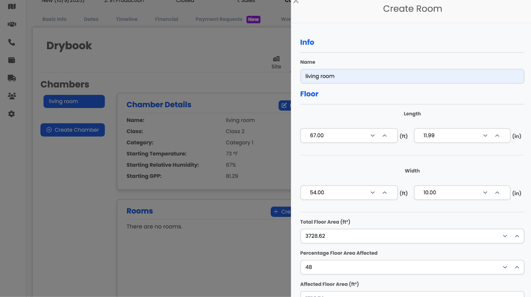
Enter:
- Room Name (e.g., “Living Room – Front,” “Basement Bedroom”)
- Floor Details
- Height and Width
- Total Floor Area (ft²)
- Percentage Floor Area Affected
- Affected Floor Area (ft²)
- Wall Details
- Linear Wall Length
- Total Wall Area (ft²)
- Percentage Wall Area Affected
- Affected Wall Area(ft²)
- Ceiling Details
- Ceiling Height
- Total Ceiling Area (ft²)
- Percentage Ceiling Area Affected
- Affected Ceiling Area (ft²)
- Any additional construction or finish information
This detailed room data is used by Albi to:
- Help determine equipment recommendations (e.g., how many air movers/dehumidifiers)
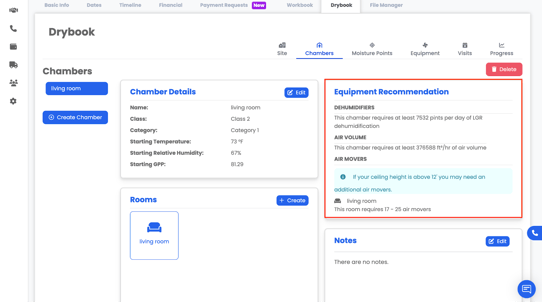
- Provide more accurate documentation for the plan
📝 Example:
“Living Room – carpet over pad on slab, drywall walls with baseboards, 9’ ceiling height.”