
How to Access Your Profile
- Log in to Albi.
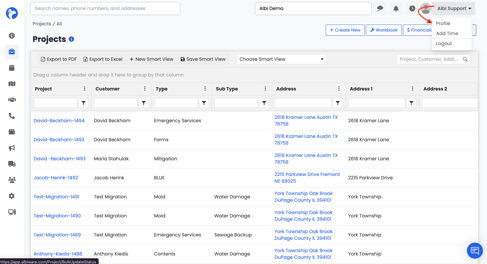
- In the top right corner of the page, click the dropdown next to your name (for example, Albi Support).
- Select Profile from the menu.
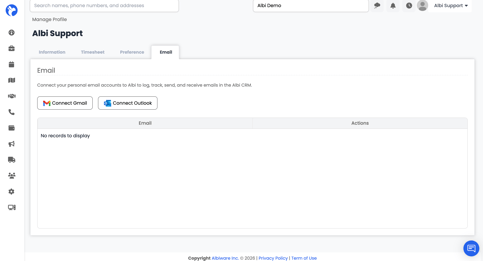
This will open the Manage Profile page, where you'll see four tabs along the top: Information, Timesheet, Preference, and Email.
Email Tab
The Email tab lets you connect your personal email account to Albi so you can log, track, send, and receive emails directly inside the Albi CRM. Albi supports both Gmail and Outlook.
Connecting Gmail
- Click the Connect Gmail button.
- A Google sign-in window will open. Choose the Google account you want to connect.
- Review the permissions Albi is requesting (View your email messages and settings, Send email on your behalf), then click Allow.
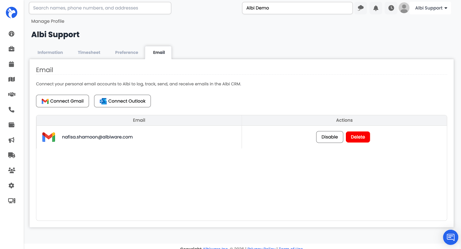
- Once you're returned to Albi, your Gmail account will appear in the list at the bottom of the page.
Connecting Outlook
- Click the Connect Outlook button.
- Sign in with your Microsoft account when prompted.
- Approve the permissions Albi requests, and you'll be returned to the Email tab with your account connected.
Managing Connected Accounts
Once an email account is connected, you'll see it listed with two action buttons:
- Disable - temporarily turn off the integration without removing the account. Useful if you want to pause email sync but keep the connection saved.
- Delete - permanently remove the email account from Albi. You'll need to reconnect from scratch if you want to use it again.
Tip: Only connect email accounts you actually use for work. Once connected, emails to and from that account can be logged automatically against the right project or contact in Albi.
Frequently Asked Questions
I can't edit a Smart View — why?
You can only edit or delete Smart Views you created yourself. If a teammate created the Smart View, ask them to make the change or to share their smart view with you.
Will my password change apply to the mobile app?
The Change Password field updates your Albi web login. Your mobile PIN is separate — update it in the Change Mobile App Login Pin field.
Do I have to connect my email?
No. The email integration is optional. If you'd rather keep your email separate from Albi, you can skip this step. You can always come back and connect later.