Configure When Projects Sync (Project Creation Condition)
After connecting, you decide when a project in Albi should be created in Clean Claims.
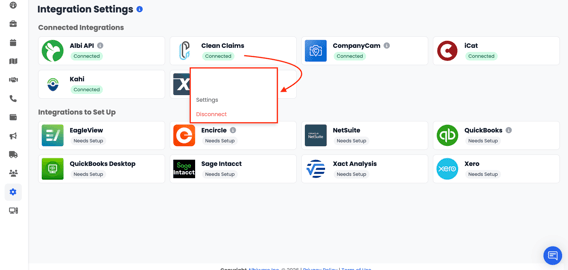
- Go to Settings → Integrations.
- Click the Clean Claims tile, then choose Settings.
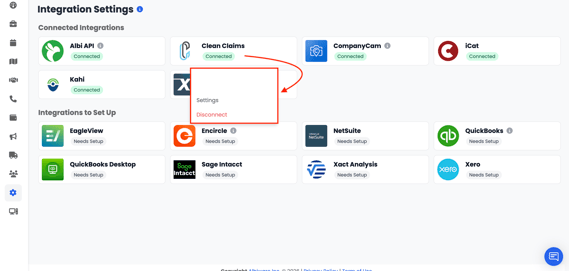
- In the Clean Claims Settings panel, open the Project Creation Condition dropdown and select one of the three options below.
Three Sync Options
|
Option |
What it does |
|---|---|
|
Everytime Project Created |
Every new Albi project is automatically created in Clean Claims as soon as it is created in Albi. |
|
Certain Statuses |
Projects only sync to Clean Claims once they reach the project status(es) you select (for example, In Progress or Mitigation Started). |
|
Certain Dates |
Projects only sync when their selected date field falls within the date range you choose. |
After choosing a condition, save your settings. The rule applies going forward to newly created projects.
Syncing Projects On Demand
Sync a Single Project
- Open the project in Albi.
- In the top-right corner, click the Actions button.
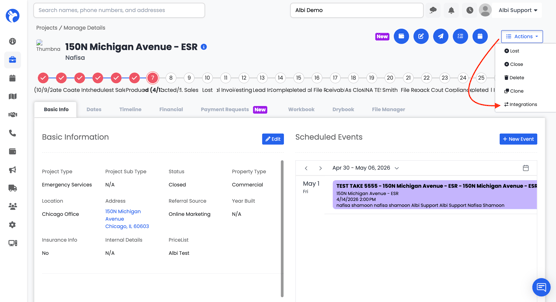
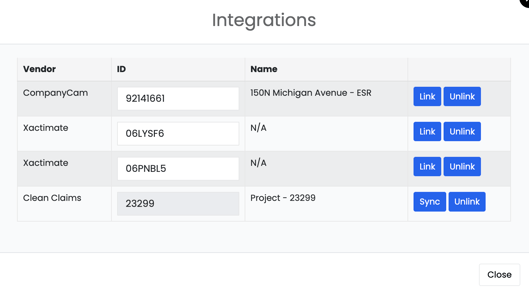
- Choose Integrations, then Clean Claims.
- Click Sync. That specific project will be sent to Clean Claims.
Disconnecting or Updating Settings
- Go to Settings → Integrations.
- Click the Clean Claims tile to open the menu.
- From the menu you can choose:
- Settings — change your Project Creation Condition.
- Disconnect — fully unlink Clean Claims from Albi. Existing projects already synced will remain in Clean Claims, but no new updates will be pushed until you reconnect.