
What Are Check Deposits?
Check Deposits allow restoration contractors to deposit insurance checks digitally through Albi Pay. Instead of mailing checks or visiting a bank, you can submit checks online and receive funds directly into your business bank account.
Before using Check Deposits, a one-time onboarding process is required.
Prerequisites
Before starting onboarding, make sure:
- Albi Pay is already set up
- You have admin or payment permissions in Albi
- Your company has a U.S. business bank account (personal accounts are not supported)
If you already use Albi Pay for cards or ACH, some business information may be pre-filled.
Where to Start
You can begin onboarding from multiple locations within Albi:
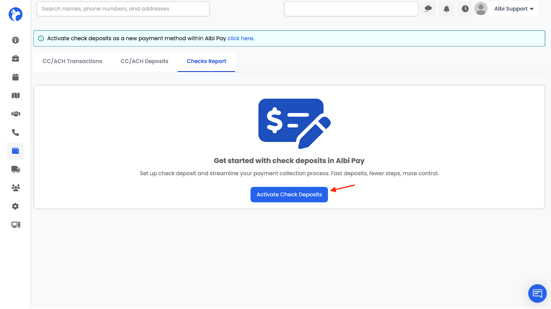
- The banner at the top of the screen that says “Activate Check Deposits”
- Payments → Check Reports, then click Activate Check Deposits
Clicking either option will open the onboarding flow.
Onboarding Steps
Step 1: Company Information
You’ll enter information to verify your business.
Required information:
- Company name (must match your bank account name exactly)
- Tax ID (EIN)
- Business address
- Phone number
- Company website
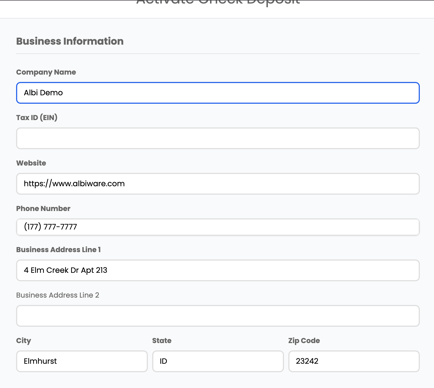
Important: The company name must exactly match the name on your bank account (including LLC, Inc., and punctuation). Mismatches can cause verification delays.
Step 2: Owner Information
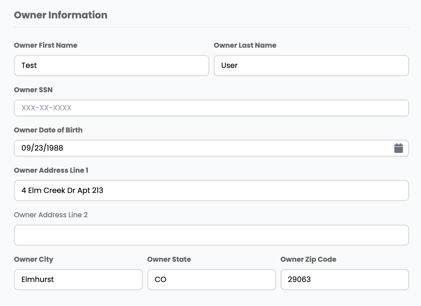
You’ll provide details for one principal owner or officer.
Required information:
- Owner’s full legal name
- Owner email address
- Owner Social Security Number (SSN)
The SSN is required for business verification. It is securely transmitted to our payment partner and is not stored by Albi.
Step 3: Bank Account Information
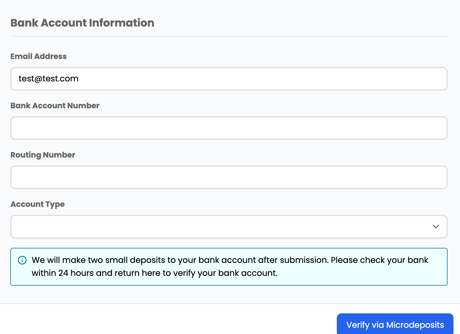
Enter the bank account where check funds will be deposited.
Required information:
- Bank routing number (9 digits)
- Bank account number
- Account type (Checking or Savings)
Validation tips:
- Double-check all numbers before submitting
- Incorrect information can delay verification
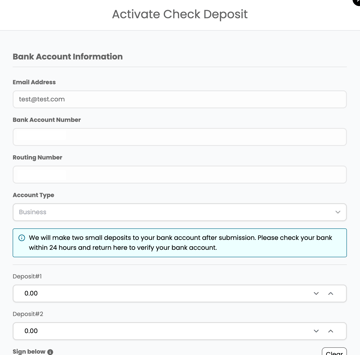
Step 4: Micro-Deposit Verification
To confirm bank ownership:
- Two small deposits will be sent to your bank account
- Deposits usually appear within 1–2 business days
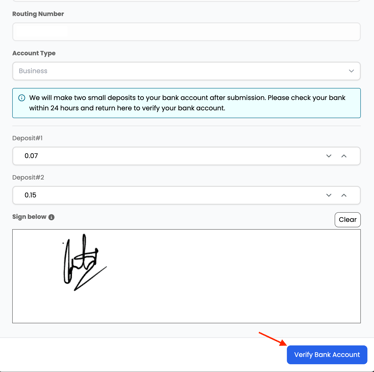
- Return to Albi and enter the exact deposit amounts
Once entered correctly, your bank account is verified.
Step 5: Signature Collection
After your bank is verified, you’ll add a digital signature.
This signature is stored securely and used to automatically endorse checks, so you don’t need to sign each check manually.
Activation Complete
Once all steps are finished:
- Check Deposits are fully activated
- The activation banner disappears
You can request Check Deposits from the Payments section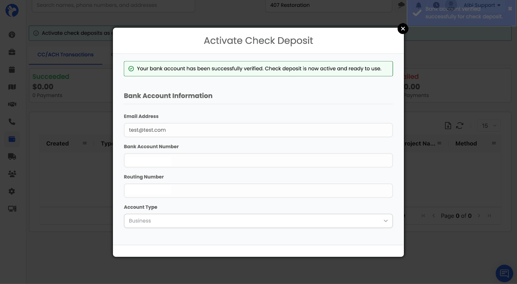
FAQs
Q: How long does onboarding take?
A: The form takes 5-10 minutes. Micro deposits take 24-48 business hours. Total: 2-3 days.
Q: Why do we need the owner's SSN?
A: Required for KYB (Know Your Business) compliance. This verifies the business is legitimate. Albi doesn't store SSN - it's sent directly to Checkbook.
Q: What if we have multiple owners?
A: Only one principal officer/owner is needed for onboarding.
Q: Can users use a personal bank account?
A: No. The bank account must be a business account in the company's name.
Q: What if micro deposits seem to be delayed?
A: Some banks (especially credit unions) can take 3+ business days. If nothing after 4 business days, check that account details are correct.
Q: Can users change bank accounts later?
A: Yes, but users will need to go through micro deposit verification again for the new account.